I Built a Fitness App in 4 Hours Using AI and it's not just social media hype
Originally published on LinkedIn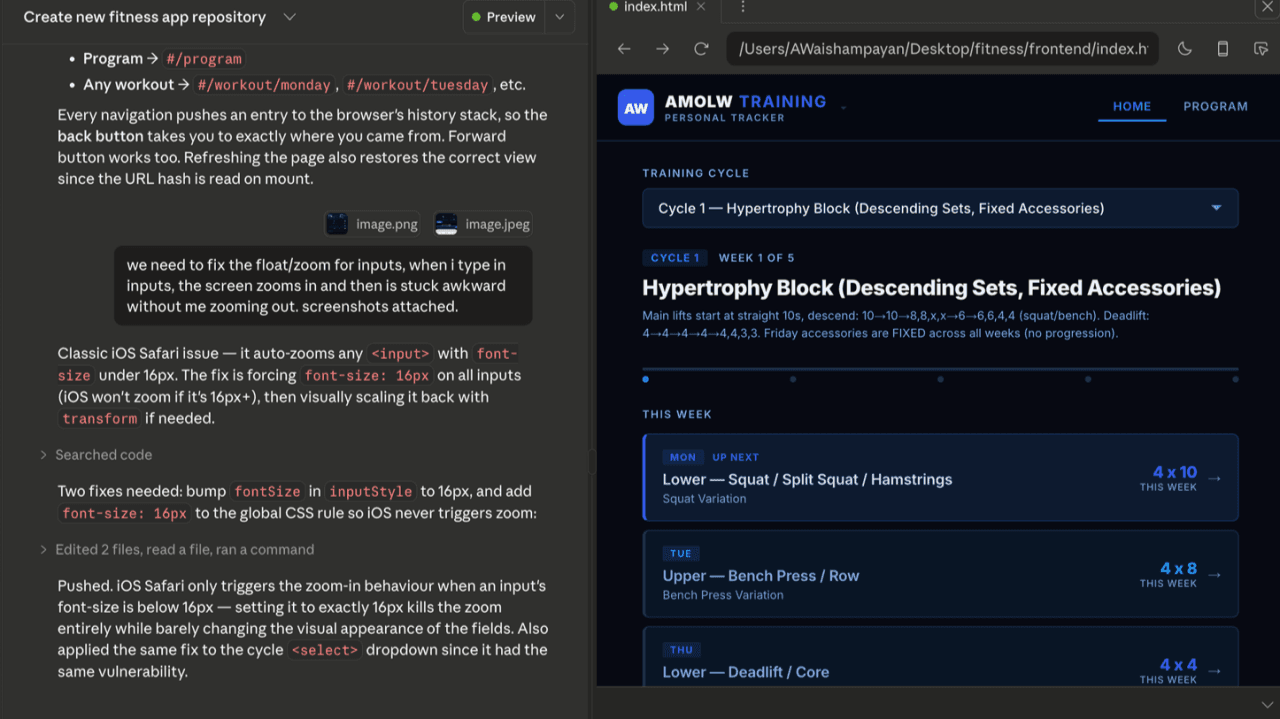
I didn't plan to build a fitness app.
I didn't scope it, write a PRD, or block time on my calendar.
I just started.
And then I didn't stop.
Roughly fourish hours later, I had a working, personalized fitness app running live in a browser, built entirely through AI.
This wasn't a stunt. It was a test: how real is the acceleration everyone is talking about?
The Setup Took 5 Minutes
Before anything else, I set up three things:
- Cloud-based AI coding environment (CloudCode)
- GitHub for version control
- Vercel for deployment
That was it.
No local environment headaches. No configuration rabbit holes. Within minutes, I had a system where:
- Code could be generated
- Changes could be tracked
- Everything could be deployed live instantly
After that, I barely touched setup again. Everything flowed through the AI.
Step 1: Ground It in Reality
The first thing I didn't want was a generic, AI-generated workout app.
Most AI demos fall into this trap: they look impressive, but they're shallow. No context. No personalization. No real usefulness.
So I gave it context.
For the past 2–3 years, I've been part of gyms that send structured daily workouts via email, typically organized into 6-week cycles (progressing from high reps to low reps).
That meant I had years of programming sitting in my inbox.
So I told the system:
- Pull my workout emails from specific senders
- Extract and organize them into structured programs
- Group them into cycles
- Normalize everything into a usable format
Then I had it compile all of that into a single reference layer the app could use (.json file)
This took ~20–30 minutes.
What I ended up with wasn't "AI-generated fitness."
It was my actual training history, structured and usable.
That's the difference between novelty and utility.
Step 2: Turn It Into Something Usable
Next, I had it build a basic interface which was a calendar-style view of workouts.
Nothing fancy.
Just:
- Select a week
- See the workout
- Navigate easily
At this point, it was essentially "brochureware", a clean way to access what used to live in my email.
But this is where the shift happens.
Instead of stopping, I kept iterating.
Step 3: Add a Feedback Loop
I wanted more than a reference tool. I wanted progression.
So I added:
1. Workout Journaling
- Log weights and reps per exercise
- Persist history over time
2. Suggested Progression
- If historical data exists → suggest increases based on prior performance
- If not → estimate based on height, weight, and general strength benchmarks
Now it gave me suggestions and metrics to focus on (No I wasn't influenced by board meetings...)
Step 4: Remove Friction Everywhere
Then I started eliminating all the small annoyances I normally deal with:
Exercise Lookup
I don't remember every movement.
So I added a simple action:
- Tap an icon → instantly search how to perform the exercise
No thinking. No switching apps. Just embedded context.
Multi-User Profiles (Real-World Use Case)
My wife uses similar workouts.
So I added:
- Multi-user support
- Separate journal histories
- Profile switching (modeled after streaming platforms)
Tap the logo → switch users → everything updates.
Familiar UX. Zero learning curve.
Step 5: Real-Time Development Is the Real Breakthrough
Here's the part that actually changed how I think about building.
Every time I made a request:
- Code was generated
- Changes were committed via GitHub, with comments
- A live version was deployed via Vercel via automation
- I could instantly see the result in a browser
No manual deploys. No coordination. No lag.
This is what people mean by "AI acceleration", but most don't explain it clearly. I wanted to experience it for myself.
It's not just faster coding.
It's:
- Instant iteration
- Continuous deployment
- Built-in documentation
- Full change tracking
All happening automatically.
Step 6: QA Became… Normal Language
Testing was just as interesting.
The next morning I'd open the app on my phone at the gym and notice things like:
- Spacing issues
- Layout inconsistencies
- UI friction
Instead of writing tickets or specs, I'd just:
- Take a screenshot
- Send into Claude, Say: "This looks off—fix it"
That's it.
No breakdown. No translation into technical language.
And it worked.
Because the system could:
- Interpret intent
- Identify where changes were needed
- Apply them consistently across the app
That's a big shift from traditional workflows.
What This Actually Proves (And What It Doesn't)
It's easy to overhype this.
So here's the honest take:
What is real
- You can prototype extremely fast
- You don't need heavy upfront planning
- You can iterate in true "build → test → refine" loops
- Individuals can now build things that previously required teams
This is real leverage.
What is not solved
This is not enterprise software development.
It doesn't address:
- Complex integrations
- Large-scale user systems
- Legacy architecture
- Deep workflow dependencies
If you drop AI into a messy, existing system, it will struggle.
Where it shines is:
- Net-new builds
- Clean systems
- Context-rich environments
The Bigger Takeaway: Speed Isn't the Moat
The most important realization from this wasn't "AI is fast."
We already knew that.
The real question is:
If anyone can build quickly, what actually matters?
It's not UI.
It's not speed.
It's:
- Data
- Context
- Workflow
- Insight
- Decision-making
The companies that win won't be the ones who build fastest.
They'll be the ones who:
- Have the deepest understanding of the problem
- Own meaningful data
- Apply human judgment where it actually matters
AI amplifies capability.
It doesn't replace thinking.
Final Thought
I didn't set out to build a fitness app.
I set out to understand something firsthand.
What I learned is simple:
You can go from idea → working product in hours.
But turning that into something valuable still depends on how well you understand the real world it's meant to serve and that part hasn't changed!!